
Written by Russell Reeve, PhD. LinkedIn profile: linkedin.com/in/russell-reeve
On this page
Stop Searching for Client Information and Start Delivering Value: Why Client Management Software for Consultants Helps You Be More ProductiveMore Than Contact ManagementCRM vs. Client Management Software for ConsultantsThe Hidden Cost of Searching for InformationClient Management Software for Consultants: Pricing ComparedTimeCatchApp vs. Scoro vs. Accelo vs. Productive vs. BigTime vs. Kantata vs. Plutio vs. ClustdocThe 8 Best Client Management Tools for Consultants, ComparedMy Personal CRM WorkflowWhy I Care About Client ContextFrequently Asked QuestionsDeliver Better Client ExperiencesRelated PagesStop Searching for Client Information and Start Delivering Value: Why Client Management Software for Consultants Helps You Be More Productive
Client management software is different than customer relationship management (CRM) software. CRM is designed for the sales process, storing information about prospects and the communication with potential clients. Once you have a client, then client management software steps in.
Client management software for consultants does more than store contact information. It should also standardize your invoices and link your invoices to completed activities; show project and financial status, both to you and your clients; warn you when projects are trending to out of scope; and allow clients to see the payment history and project status, and connect with you more easily. Ideally, your clients should be able to DM you within the system.
Consultants and professional service providers need a complete view their relationships with clients, including deliverables (completed, in-progress, upcoming), documents including those that need approvals, communications, invoices with documented support of project activity, and payments.
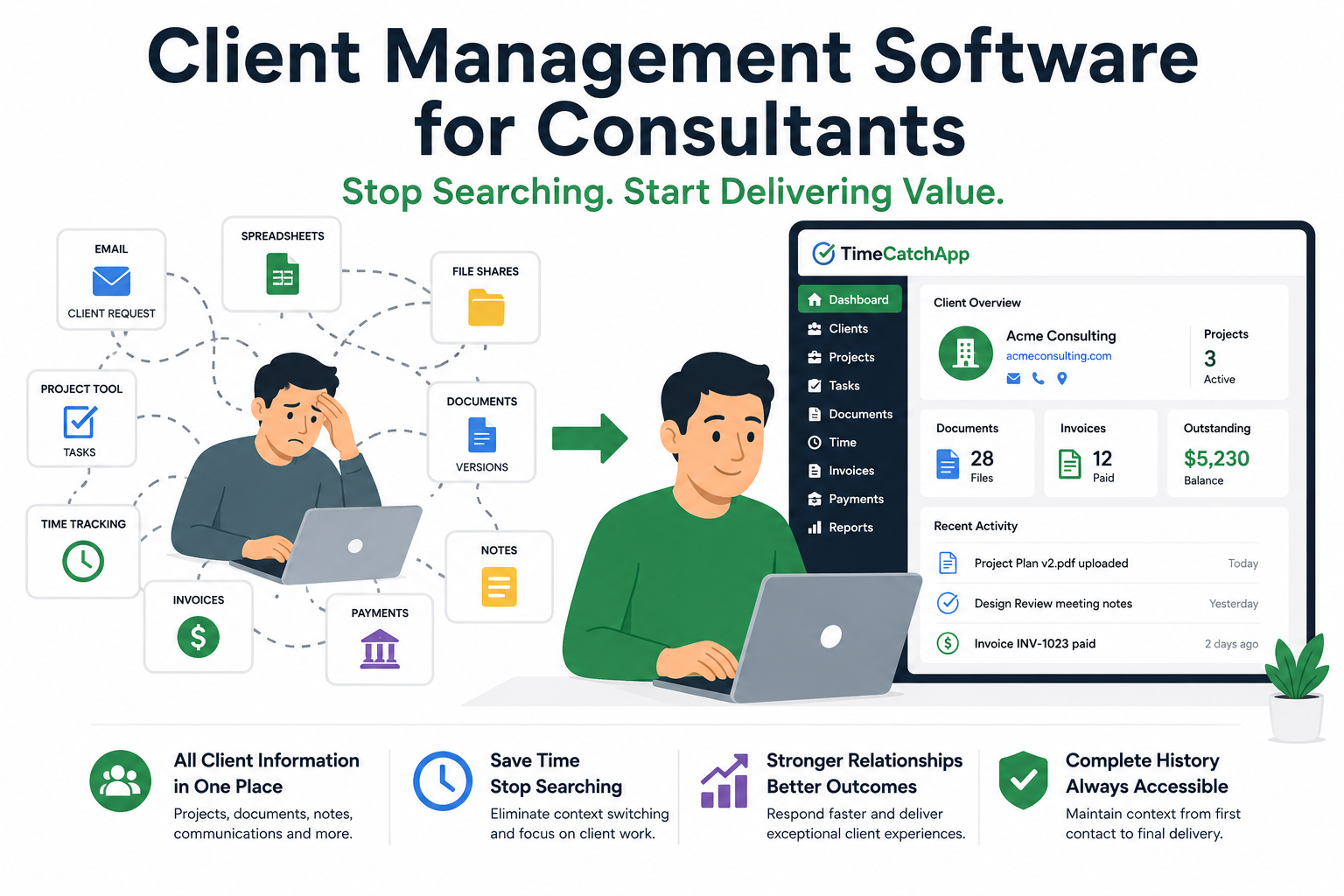
Most professional service providers try to get there using Excel or equivalent, Word, and similar applications. Our experience is that this works well only for consulting practices with the smallest of clientele. When client information is scattered across email, spreadsheets, shared drives, CRM systems, document repositories, and project management tools (like Microsoft Project), consultants waste valuable time searching for information instead of serving clients.
We have been in that situation. That was our business practice, even when we worked for a very large consulting organization. Big organizations do not necessarily have better software than smaller, but they do have specialization of roles which covers a little for the inefficiencies of their practices. Smaller practices do not have that luxury.
That is why we built TimeCatchApp. As consultants ourselves, we need better tools. Our loss of time for tracking our projects, deliverables, invoices, and communicating with our clients was significant. TimeCatchApp did a study on the time lost just to time entry, and found that this one, small portion of the administrative burden was costing on average more than 3 hours per month. If you including tracking of the work, the amount of time explodes. Our conservative estimate was over $16,000 per year lost on these activities.
Sign up for TimeCatchApp now and recover that lost time. You will have more time to build relationships, strengthen your technical skills, write papers and blog posts, and grow your practice.
TimeCatchApp brings client management, project management, time tracking, documentation, invoicing, and financial visibility together in a single platform so you can spend less time searching and more time delivering value.
More Than Contact Management
Platforms such as Salesforce and similar CRM systems were design specifically to manage sales pipelines, opportunities, approvals, forecasts, and revenue projections. But is that what a small consultancy needs? This is probably overkill.
What do consultants need? Small consultants need contact management, true, but consultants also need to link the sales discussions with the project work itself. Consultants need direct connections so that no information gets lost, because once the contract is signed, the billable work begins.
And once the work starts, consultants need visibility into:
- Client history
- Active projects
- Deliverables
- Documents
- Communications
- Timelines
- Financial activity
- Payments
Consultants need to deliver, and they need project status available in real-time.
TimeCatchApp was designed around service delivery rather than sales management, providing a complete view of the client relationship throughout the engagement lifecycle.
CRM vs. Client Management Software for Consultants
CRM and client management software solve different problems in a consulting practice, even though the terms get used interchangeably.
A traditional CRM — Salesforce, Pipedrive, HubSpot — is built for the sales cycle: Tracking leads, moving opportunities through a pipeline, and forecasting revenue. The CRM’s job is done upon contract signature.
Client management software picks up from there. It’s built around the engagement itself: Project history, deliverables, documents, time tracking, invoices, and communication — for the life of the relationship, not just the sale.
As an aside, we have seen Salesforce in particular used for post-sales work, but it is not easy to use, takes significant training to manage, and it can be expensive, especially for a small organization. Larger organizations have experts who are dedicated to managing these CRM systems. Small consultants cannot afford that overhead.
For consultants, the distinction between a CRM and a client management software matters more than for most businesses, because the bulk of the work — and the risk of losing context — happens after the deal closes, not before. You are not making a sale where the customer takes delivery of their product, and you see them again when they need another purchase. As a consultant, most of your interaction is after the sale, where you are continually producing output, small bits of the product. And it all must align with what was promised in the contract and sales discussions. A pure CRM has little to say about a missed deliverable or an overdue invoice three months into an engagement. But a client management software will help you not miss that deliverable, and will highlight the overdue invoice.
Some tools blur the line. Scoro, Accelo, and Productive bundle a sales pipeline alongside delivery tools, functioning as both a consulting CRM and client management platform. TimeCatchApp, Plutio, and Clustdoc lean toward the delivery and onboarding side, assuming you already have a way to track leads before they become clients.
| Traditional CRM | Client Management Software for Consultants | |
|---|---|---|
| Primary focus | Winning new business | Delivering signed work |
| Lifecycle stage | Pre-sale | Post-sale, ongoing |
| Core data tracked | Leads, deals, pipeline stage | Projects, documents, time, invoices |
| Typical buyer | Sales teams, BD-heavy firms | Solo consultants, service delivery teams |
| Examples | Salesforce, Pipedrive, HubSpot | TimeCatchApp*, Plutio, Clustdoc |
| Hybrid tools (both) | — | Scoro, Accelo, Productive |
*For an example of how to use TimeCatchApp to track client interactions and feed those automatically into the delivery workflow, read the My Personal CRM Workflow section below.
The Hidden Cost of Searching for Information
ow often do you spend time searching for the latest version of a document, a client request, a project decision, previous invoices, or historical project notes?
Those searches slow delivery and pull your attention away from the client’s problem and onto finding files that should already be organized with the project. In my experience, the top culprits are:
- Communication in email, or Slack, or…
- Project files sitting on your desktop, plus some on a shared drive, plus some in a Box.com account
- Meeting notes not connected to the project, and sent out days after the meeting, or just sitting in the draft folder…
- Time reports in yet another system
- Invoices and payments in the payment system, possibly with your bank, and inaccessible to the project
TimeCatchApp keeps client information connected to the work itself, reducing time spent searching and increasing time spent delivering value.
How often do you spend time searching for:
- The latest version of a document
- A client request
- A project decision
- Previous invoices
- Historical project notes
This scattering of information is not client management. It is chaos disguised as cheap, best-of-class software for each task. What you really need is one system that has all of this information together, where you always know where the information is, and you never need to enter it (and QC it) twice.
TimeCatchApp keeps client information connected to the work itself, reducing time spent searching and increasing time spent delivering value
Client Management Software for Consultants: Pricing Compared
Pricing structures vary a lot across this category — some vendors bill per user, some bill a flat rate per account, and the larger PSA platforms increasingly quote custom pricing instead of publishing rates at all. Here’s what each currently charges, pulled from vendor pricing pages.
| Software | Starting price | Billing model | Free trial |
|---|---|---|---|
| TimeCatchApp | $10/month (Standard) | Flat per user; Expert tier is $30/month per user | 14 days (Pro plan) |
| Plutio | $19/month | Flat per account, team features from Pro ($49/month) | 7 days |
| Productive | $10/user/month | Per user | 14 days |
| BigTime | $20/user/month | Per user; Advanced/Premier pricing on request | Yes (contact for terms) |
| Scoro | $19.90/user/month (annual billing; $23.90 monthly) | Per user, 5-user minimum | 14 days |
| Accelo | Custom quote only | Per user, tailored to team size | Demo-based, no public trial |
| Clustdoc | $190/month (Pro plan) | Flat per account | Demo-based |
| Kantata | Custom quote only (typically $50+/user/month) | Per user, enterprise-negotiated | Demo-based, no public trial |
A few things worth noting if you’re comparing on price alone: Scoro’s published rate requires a 5-seat minimum, so a 2-person consultancy pays for 5 seats regardless. Accelo and Kantata have both moved to sales-quote-only pricing, which usually signals a higher total cost aimed at larger service teams. Plutio and Clustdoc price per account rather than per user, which can make them cheaper for growing teams and more expensive for solo consultants compared to per-seat tools.
TimeCatchApp vs. Scoro vs. Accelo vs. Productive vs. BigTime vs. Kantata vs. Plutio vs. Clustdoc
| Feature | TimeCatchApp | Scoro | Accelo | Productive | BigTime | Kantata | Plutio | Clustdoc |
|---|---|---|---|---|---|---|---|---|
| Built for | Solo & small consultancies (1 – 100 people) | Mid-market agencies/consultancies | Mid-market PSA | Agencies & consultancies | Accounting/consulting PSA | Enterprise service orgs | Freelancers & solopreneurs | Compliance-heavy onboarding |
| Client portal | Yes | Add-on | Limited | Limited | Advanced tier+ | Limited | Yes, white-labeled | Yes, core feature |
| Project management | Yes | Yes | Yes | Yes | Yes | Yes | Yes | Limited |
| Time tracking | Yes | Yes | Yes | Yes | Yes | Yes | Yes | No |
| Document management | Yes | Limited | Limited | Docs module | Limited | Limited | Yes | Yes, core feature |
| Invoicing & billing | Yes | Yes | Yes | Yes | Yes | Yes | Yes | No |
| Resource/capacity planning | Limited | Yes | Yes | Yes | Yes (Advanced+) | Yes, enterprise-grade | Limited | No |
| Sales CRM / pipeline | Simple from templates | Yes | Yes | Yes | No | No | Limited | No |
| Onboarding/KYC/compliance workflows | No | No | No | No | No | No | No | Yes, core feature |
| Minimum users | 1 | 5 | Varies | 1 | 1 | Enterprise-negotiated | 1 | 1 |
Feature availability compiled from each vendor’s public pricing and feature pages as of August 2026; verify current tier details before publishing, as SaaS vendors update packaging frequently.
The 8 Best Client Management Tools for Consultants, Compared
TimeCatchApp: Best for solo and small consulting practices that want client work connected end-to-end
TimeCatchApp brings client management, project management, time tracking, documentation, invoicing, and financial visibility into a single platform built specifically around consulting service delivery — not sales pipelines. Plans start at $10/month, with a 14-day free trial on the Pro plan and a free client portal.
Scoro: Best for consultancies that also need sales pipeline and profitability reporting
Scoro is consultancy and agency management software that combines project management, quoting and budgeting, a sales CRM, resource and capacity planning, retainers, time tracking, and financial reporting in one platform. It’s a strong fit for consulting firms that want quote-to-cash visibility and profitability forecasting, but the 5-user minimum and $19.90–$49.90/user/month range make it better suited to small teams and up rather than solo consultants.
Accelo: Best for consulting firms that want AI-driven forecasting and revenue-leakage detection
Accelo is a professional services automation platform focused on turning pipeline and project data into revenue forecasts, resourcing plans, and delivery-risk alerts. It integrates with HubSpot and Salesforce for firms that already run CRM there. Pricing is quote-only and tailored to team size, which typically means a higher total cost than the flat-rate tools on this list — worth it if you need the forecasting depth, overkill for a one-person consultancy.
Productive: Best for consulting and agency teams that want an integrated sales CRM plus delivery
Productive links project, resource, and financial management with an integrated sales pipeline, so consultants can manage prospective work and delivered work in the same system. It’s particularly strong on utilization reporting and profitability-by-client views. Plans start at $10/user/month (Essential) with a 14-day free trial.
BigTime: Best for consulting and accounting firms that bill by the hour and need compliance features
BigTime centers on time and expense tracking, billing, and project portfolio management, with DCAA-compliant accounting available for firms doing government-adjacent consulting work. The client portal and advanced reporting arrive at the Advanced tier and up. Essentials starts at $20/user/month.
Kantata: Best for large, multi-entity consulting and staffing organizations
Kantata (formerly Mavenlink + Kimble) is built for enterprise service organizations running complex, multi-currency, multi-entity operations, with heavy resource management and BI reporting. It’s priced and implemented at enterprise scale — quotes typically start well above $50/user/month — and isn’t a realistic fit for independent consultants or small firms.
Plutio: Best for freelance consultants who want branded client portals on a budget
Plutio bundles proposals, contracts, projects, time tracking, and invoicing with client portals that can carry your own branding and domain. It’s priced per account rather than per seat, starting at $19/month, which makes it attractive for solo consultants and small teams that don’t want per-user costs to scale with headcount.
Clustdoc: Best for consultants with document-heavy, compliance-driven client onboarding
Clustdoc isn’t really a project or time-tracking tool — it’s built around structured client onboarding: document collection, e-signature, identity verification, and approval workflows. Consultants in regulated fields (financial services, legal) who need to collect and verify client documents before work starts will find more depth here than in general client management platforms. Plans start at $190/month.
My Personal CRM Workflow
- Contact potential client
- Ask for either Request For Information (RFI) or Request For Proposal (RFP), though some smaller organizations will skip this
- Contract signing
- Work on project
- Wrap up
In all of this, we want to keep all of the information together for reference later. Even early conversations can be important. I have had customers ask for a deliverable that was not in the contract but was in an early discussion. So we do not want to lose any key information.
Contact potential client
At this point, I set up a project in TimeCatchApp. But not just any project. I will grab the CRM template from the templates. To do this:
In the Dashboard, you will have the Project pane on your left. At the top you will see the briefcase symbol. Click on it to see the templates.
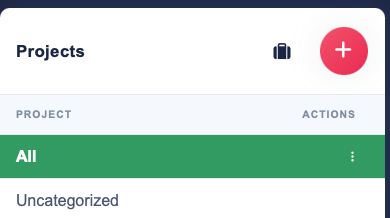
You will see a list of templates available to you. Click on Action menu, and select the Use Template option. You will then have a project created for you. Change the name to something meaningful. My preference is to use the form “Client – description”.
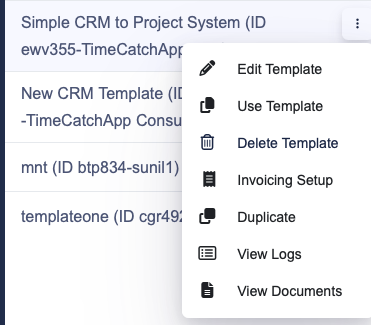
My project is now set up.
RFI or RFP
Now that you have a project, it has a series of tasks you need to do. Click complete for each task that is finished to move on to the next. Right off the bat you will see the RFI task. If you want to skip this to go straight to RFP, click complete.
The task will have a proposal template document. Feel free to use it, or not. It is free for you to use, and should speed up your time.
I will point out that every task as a Notes dialog box. This rich text editor allows you to add information as you work your way through the process, and it will stay there for your reference. Use it. I have found it to be very helpful.
Contract signing
Same process as before, but you now on the contract task. Put the contract as a document in this task for future reference. At this point, create the billable tasks onto the project as successor tasks. Three examples are already in place in the template. If you need more, add them in. If you need less, delete what you do not need.
At this stage I create the client record once and store the billing information, contacts, and branding details in TimeCatchApp. From that point forward, the information is available automatically whenever invoices are generated.
Work on project
Work on the project as you normally would, keeping track of time spent on each task. Note that billable tasks will yield invoice-able activities. For longer projects, you may want to let the system automatically generate invoices for you. That is one less activity you need to deal with.
Wrap up
Once all tasks are complete, you are done! Congratulate yourself and move onto the next project. I treat myself to nice cup of tea. But you can do something else.
Why I Care About Client Context
During my consulting career, I managed projects ranging from individual consulting engagements to global programs involving multiple stakeholders, deliverables, and teams.
One lesson remained consistent throughout every project:
The biggest risk was rarely a lack of expertise.
The biggest risk was losing context.
A missed email, an outdated document, an undocumented decision, or a forgotten client request could easily consume hours of unnecessary effort.
That experience shaped how TimeCatchApp was designed.
Every document, task, time entry, invoice, note, and client interaction is connected to the project where the work occurs, making information easier to find and easier to trust.
Frequently Asked Questions
What is client management software?
Client management software helps businesses organize and manage information about their clients throughout the relationship lifecycle.
Unlike a simple contact database, client management software can store client records, project history, documents, communications, invoices, payments, notes, and other information needed to support ongoing work.
For consultants and professional service providers, client management software serves as a central location for maintaining client context, improving responsiveness, and reducing time spent searching for information.
What is the difference between CRM software and client management software?
CRM (Customer Relationship Management) software traditionally focuses on sales activities such as lead management, sales pipelines, forecasting, and opportunity tracking.
Client management software focuses on the ongoing relationship after a client engagement begins.
While there is overlap between the two categories, consultants often need capabilities that extend beyond sales management, including:
- Project tracking
- Document management
- Deliverable tracking
- Time tracking
- Invoicing
- Payment monitoring
- Communication history
For many consultants, client management software is more relevant than a traditional sales-focused CRM because the majority of their work occurs after the contract is signed.
What is consultant CRM software?
Consultant CRM software is a specialized form of client relationship management software designed for consulting firms, freelancers, and professional service providers.
In addition to managing client contact information, consultant CRM software often supports:
- Project management
- Time tracking
- Deliverable management
- Proposal tracking
- Client communications
- Financial visibility
- Invoicing
The goal is to maintain a complete history of the client relationship while supporting the day-to-day delivery of consulting services.
Why do consultants need client management software?
Consultants manage large amounts of information across multiple client engagements.
Without a centralized system, important information often becomes scattered across:
- Shared drives
- Cloud storage systems
- Project management tools
- Spreadsheets
- Notes applications
- Accounting software
As projects become more complex, locating information becomes increasingly difficult.
Client management software helps consultants keep information organized and accessible, reducing administrative effort and improving service quality.
How do consultants manage client information?
Many consultants start by managing client information manually using spreadsheets, email folders, file systems, and notes applications.
As the number of clients and projects grows, this approach becomes difficult to maintain.
Modern client management software allows consultants to organize:
- Client contacts
- Project records
- Documents
- Deliverables
- Communications
- Invoices
- Payments
- Meeting notes
within a single environment.
This improves visibility and makes it easier to locate information when needed.
What is the best CRM for consultants?
The best CRM for consultants depends on how the consultant works.
Traditional CRM platforms such as Salesforce are designed primarily for managing sales pipelines and business development activities.
Consultants often need additional capabilities that support client delivery, including project management, document management, time tracking, invoicing, and financial reporting.
When evaluating consultant CRM software, look for a platform that supports the complete consulting workflow rather than focusing exclusively on sales activities.
Can CRM software track projects and invoices?
Some CRM platforms offer project and invoicing capabilities, while others focus primarily on customer acquisition and sales management.
Consultants typically benefit from systems that connect client management directly to project execution and billing.
When project information, deliverables, time records, invoices, and payments remain connected, consultants spend less time transferring information between systems and more time delivering value to clients.
TimeCatchApp was designed to connect these activities within a single workflow.
How does client management software improve client relationships?
Strong client relationships depend on access to accurate information.
When consultants can quickly locate previous conversations, project decisions, deliverables, invoices, and supporting documents, they respond faster and provide a more professional client experience.
Client management software helps ensure that important information remains available throughout the life of the engagement, reducing misunderstandings and improving communication.
What is context switching and why does it matter?
Context switching occurs when a consultant stops working on one activity and shifts attention to another.
Examples include:
- Searching for documents
- Looking for previous emails
- Reviewing project history
- Entering information into multiple systems
- Reconstructing client discussions
Each interruption requires mental effort and time to regain focus.
Over time, these interruptions accumulate and reduce productivity.
Many consultants spend more time managing information than they realize.
Reducing context switching is one of the most effective ways to improve efficiency and preserve billable time.
How does TimeCatchApp reduce context switching?
TimeCatchApp reduces context switching by keeping client information connected to the work itself.
Documents, project tasks, deliverables, communications, notes, time records, invoices, and payments remain associated with the same project and client record.
Instead of searching through multiple applications, consultants can access information from a single location.
This reduces administrative overhead, improves productivity, and helps consultants maintain focus on client work.
Is client management software useful for solo consultants?
Yes.
Solo consultants often receive the greatest benefit because they typically perform every business function themselves.
In addition to delivering services, they must manage client communications, project planning, documentation, invoicing, payment tracking, and business administration.
Client management software helps reduce administrative effort by organizing information and streamlining workflows.
This allows solo consultants to spend more time serving clients and growing their business.
What should I look for when choosing client management software?
When evaluating client management software for consulting or professional services, look for a solution that provides:
- Client relationship management
- Project management
- Document management
- Time tracking
- Deliverable tracking
- Invoicing
- Payment tracking
- Reporting and visibility
- Minimal duplicate data entry
The most effective platforms reduce the need to switch between multiple tools and help maintain a complete history of each client engagement.
By keeping information connected, consultants can improve productivity, reduce administrative work, and deliver a better client experience.
What is the difference between Salesforce and client management software for consultants?
Salesforce is one of the most widely used CRM platforms in the world. It was originally designed to help sales organizations manage leads, opportunities, sales pipelines, forecasts, approvals, and customer acquisition activities.
For organizations with dedicated sales teams and complex sales processes, Salesforce can be an excellent solution.
Consultants, however, often face a different challenge.
Once a consulting engagement begins, the focus shifts from winning the business to delivering the work.
At that point, consultants need access to information such as:
- Project plans
- Deliverables
- Documents
- Meeting notes
- Client communications
- Time records
- Invoices
- Payments
- Project financial performance
While Salesforce can be customized to support some of these activities, many consulting firms find themselves adding additional systems for project management, document management, time tracking, invoicing, and financial reporting.
The result is that client information becomes distributed across multiple applications.
For example, a consultant may use:
- Salesforce to manage the client relationship
- A project management tool to manage tasks
- A document repository to store files
- A time tracking system to record work
- Accounting software to create invoices and track payments
Although each tool may perform its individual function well, consultants often spend significant time moving information between systems and searching for project history.
Client management software designed specifically for consultants takes a different approach.
Instead of focusing primarily on sales opportunities, it focuses on maintaining context throughout the entire client engagement.
The goal is to keep client information, projects, documents, deliverables, communications, time tracking, invoicing, and financial activity connected in a single environment.
This reduces administrative effort, improves visibility, and helps consultants spend less time searching for information and more time delivering value to clients.
For consulting firms, freelancers, and professional service providers, the question is often not whether Salesforce is a good CRM. The question is whether a sales-focused CRM is the right tool for managing ongoing client delivery.
Many consultants discover that preserving project context is just as important as managing customer relationships.
Deliver Better Client Experiences
Clients hire consultants for expertise, responsiveness, and results.
TimeCatchApp helps you provide all three while maintaining a complete history of every engagement.
Start your free trial and experience consultant CRM software designed for professional services.
Related Pages
Consultant Time Tracking Software