
Written by Russell Reeve, PhD. LinkedIn profile: linkedin.com/in/russell-reeve
Many consultants use “free” invoicing software. It may come from a bank, an accounting package, a spreadsheet template, or even a Word document.
The software itself costs nothing.
The process costs far more.
In our experience, consultants often spend 5 to 10 hours per month gathering time records, reviewing project notes, checking deliverables, preparing invoices, correcting errors, sending invoices, and following up on payments.
At a consulting rate of $200 per hour, that administrative work represents between $1,000 and $2,000 of lost professional time every month.
That is time that could have been spent:
- Serving clients
- Developing new business
- Building expertise
- Delivering additional billable work
The real cost of invoicing is not software. The real cost is the administrative effort required to transform completed work into an accurate invoice.
TimeCatchApp was designed to eliminate that effort by connecting project work, time tracking, deliverables, client management, and invoicing into a single workflow.
On this page
Stop Losing Revenue Between the Work and the InvoiceWhy Traditional Invoicing Fails ConsultantsLearn From My ExperienceWhat I Learned Managing Consulting ProjectsTime Is the Raw Ingredient in Every InvoiceWhy These Are Unnecessary CostsGenerate Invoices Directly From Your WorkGain Visibility Into Project Financial HealthDesigned Specifically for Consultants and Professional Service ProvidersFrequently Asked QuestionsStart Getting Paid For All The Work You PerformRelated PagesStop Losing Revenue Between the Work and the Invoice
You, the consultant or service providers, are most likely not losing revenue because of lack expertise. You are losing revenue because invoicing is disconnected from the work itself.
Hours get forgotten. Small tasks never make it onto invoices. Deliverables completed weeks ago are difficult to reconstruct. Before long, billable work becomes unbilled work.
TimeCatchApp was built to eliminate that gap.
Our consultant invoicing software connects time tracking, project work, deliverables, and client billing in one system. Every billable activity is captured within the project where it occurs, making invoice generation fast, accurate, and easy.
Why Traditional Invoicing Fails Consultants
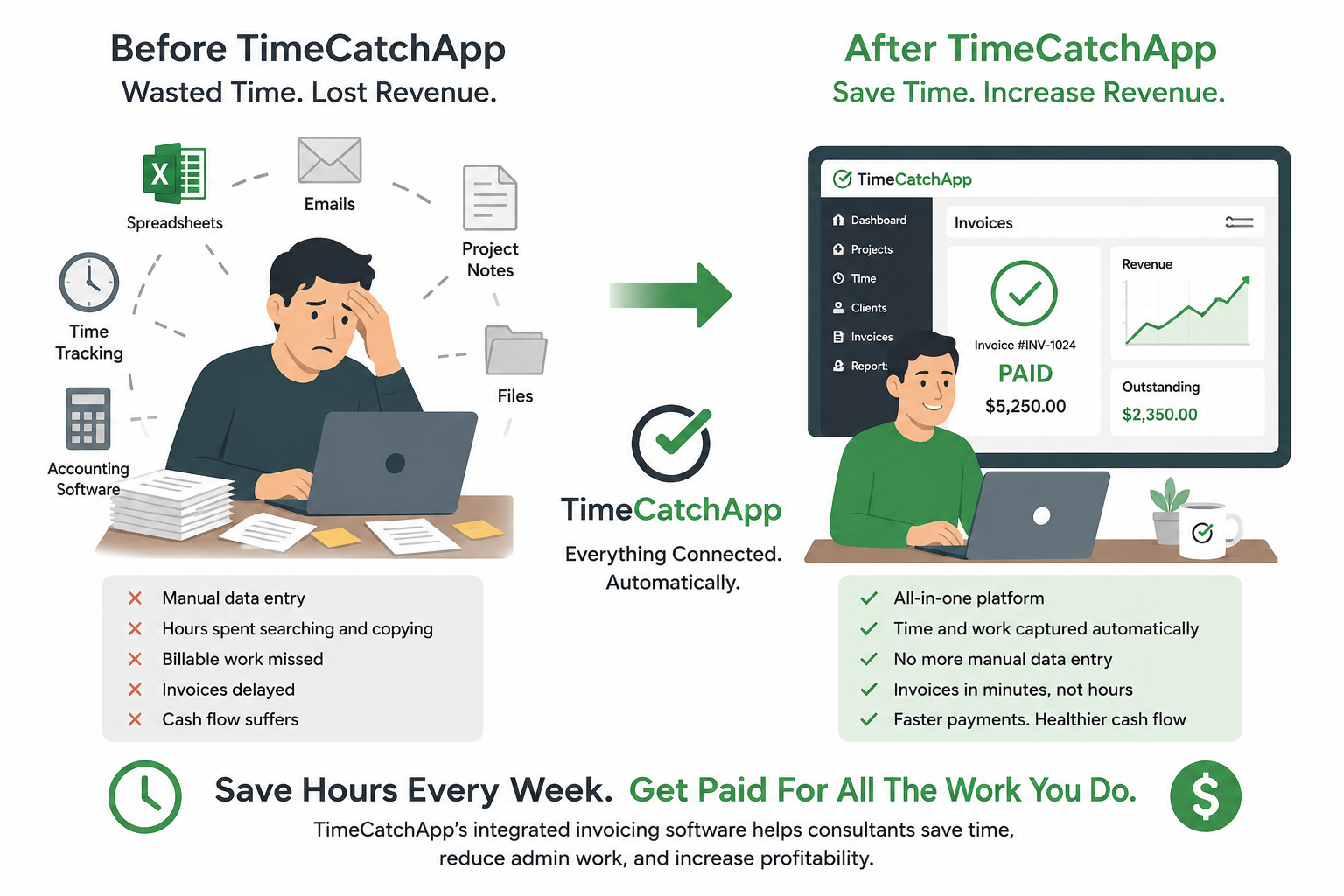
In our experience, most consultants use a combination of spreadsheets, timesheets, accounting software, email, and project management tools. If this sounds familiar, read on, because we lives this way as well.
But this creates several problems:
- Billable activities are overlooked.
- Invoice preparation becomes a monthly administrative burden.
- Payment follow-up requires manual effort.
- Project profitability is difficult to measure.
- Financial information is spread across multiple systems.
The result is unnecessary administrative work and lost revenue.
Learn From My Experience
What I Learned Managing Consulting Projects
Throughout my consulting career, I worked on both time-and-materials and fixed-deliverable projects.
No matter how the work was priced, one challenge never disappeared:
Turning completed work into an accurate invoice.
The problem was not performing the work.
The problem was documenting the work, remembering the work, and transferring information between multiple systems.
Every month, consultants would reconstruct project activity from calendars, emails, spreadsheets, meeting notes, and timesheets.
The work had already been completed.
Yet creating the invoice became a second project.
That experience led to an important realization:
The invoicing problem is really an information management problem.
When project work, time tracking, deliverables, and billing exist in separate systems, consultants spend valuable time reconstructing context instead of serving clients.
Tracking Time Is Hard
I know, sounds counter-intuitive, but that is our experience. Why is it hard?
- You have to remember to record the time when you start a new task, and we often forget to do this
- You have to remember to write down the project/task. By write, I mean one of several ways to record: Pen and paper, put into Word document, put into Excel, etc.
- When you do this, you are distracting from the thinking you are doing, the cognitive context. You have to shuffle your working memory out, replace it with the reporting memory, move that out, and bring back your prior context. All of this takes time, and it not productive.
The result of all this is lost time, possibly as high as 15 minutes!. If you are working on high context studies, it will take additional time to make these transitions. This will slow you down, quite often substantially.
This is why you can get to lunch, been busy all morning, and still not accomplished what you set out to do! These context switches cause periods where you need to regain the working memory before you can start productive work again.
Time Is the Raw Ingredient in Every Invoice
An invoice is not created from thin air.
It is assembled from information that already exists somewhere inside your business.
For consultants, the primary ingredients are:
- Time spent performing work
- Project tasks completed
- Deliverables produced
- Milestones achieved
- Client-approved changes
Traditional invoicing systems require you to gather these ingredients manually from multiple sources.
You review emails.
You search project notes.
You examine spreadsheets.
You check calendars.
You compare timesheets.
Then you manually enter the information into an invoice.
Every one of these steps creates opportunities for errors, omissions, duplicate entries, and lost billable revenue.
TimeCatchApp eliminates this process by capturing the information while the work is occurring. Because project activity, time tracking, deliverables, and invoicing are connected, the invoice is built from information already present inside the system.
Instead of reconstructing work after the fact, you simply review and approve.
| Ingredient | Source | How it usually gets entered and risks |
| Time spent on project | Time sheets, Excel records, written records | Manually entered the information, either into a time sheet system, or manually into an invoice app or document Risks: Double counting or missing time slices are two sides of the coin. Have seen this in solo operations and mature, large companies |
| Milestones or deliverables | Emails, written records, status meetings | Manually entered Risks: Deliverables missed or forgotten, not billed when recognized. |
Why These Are Unnecessary Costs
Each of these activities create multiple context switches, from finding the information, entering the information into another system, double checking for accuracy, and you can see why these consume large amounts of time and cause multiple context switches each.
This is why we built TimeCatchApp the way we did: Totally integrated, so that all information is stored within a single context state. No switching, no manual data entry, no room for errors. Everything tracked.
Generate Invoices Directly From Your Work
With TimeCatchApp, invoices are created from completed project activity.
When work is performed:
- Time is recorded.
- Deliverables are tracked.
- Billable activities are associated with the project.
- Invoice drafts are generated automatically.
Instead of rebuilding the month’s work from memory, you simply review and send.
And if you don’t want to do that much, let TimeCatchApp’s auto-generate feature work each month, on a schedule you set but it remembers. That way you can concentrate on your work, while you outsource to TimeCatchApp the administrative functions.
Gain Visibility Into Project Financial Health
Consultants need more than invoices.
They need answers to questions such as:
- How much has been billed?
- How much has been paid?
- Which invoices are overdue?
- Which projects are most profitable?
TimeCatchApp provides real-time financial visibility so you can make decisions before small problems become large ones. Each project ledger is maintained in real-time, with amounts invoiced, amounts paid, amounts owed still, amounts in draft invoice, all available to you and to your clients as they occur.
Additionally, hours spent on projects is maintain to the minute.
Designed Specifically for Consultants and Professional Service Providers
Whether you work independently or manage a small consulting practice, TimeCatchApp helps you:
- Capture more billable work
- Reduce administrative effort
- Invoice faster
- Invoice more accurately
- Improve cash flow
- Maintain professional client communications
Frequently Asked Questions
What is consultant invoicing software?
Consultant invoicing software helps independent consultants, freelancers, and professional service firms create, send, track, and manage client invoices.
Unlike general-purpose invoicing tools, consultant invoicing software is designed around billable work. It captures the time, tasks, deliverables, and milestones completed for a client and converts that activity into accurate invoices.
The best consultant invoicing software does more than generate invoices. It connects project management, time tracking, client management, and financial reporting so that invoices are built from actual project activity rather than manual data entry. TimeCatchApp goes one step further and integrates with Stripe payments for automatic tracking.
Why do consultants spend so much time preparing invoices?
Most consultants store project information across multiple systems.
Time may be recorded in a spreadsheet, project tasks tracked in another application, deliverables documented in email, and financial information stored in accounting software.
At the end of the month, consultants must gather information from all of these sources and manually assemble an invoice.
This process often involves:
- Searching for project records
- Reviewing emails and calendars
- Verifying time entries
- Checking deliverables
- Re-entering information into invoice software
The administrative effort required to reconstruct project activity is often far greater than consultants expect.
How much time do consultants typically spend on invoicing?
The answer depends on the number of clients, projects, and invoices being managed.
Many consultants spend between five and ten hours per month gathering information, creating invoices, reviewing billing details, correcting errors, sending invoices, and tracking payments.
For a consultant billing at $200 per hour, that represents between $1,000 and $2,000 of professional time each month that could otherwise be devoted to client work, business development, or professional growth.
What causes billable work to be missed on invoices?
Missing billable work usually occurs when there is a gap between performing the work and recording the work.
Examples include:
- Unscheduled client calls
- Quick document reviews
- Small project tasks
- Client support activities
- Follow-up communications
When consultants rely on memory to reconstruct project activity days or weeks later, some work is inevitably forgotten.
The longer the delay between completing the work and documenting it, the greater the risk of missing billable activities.
How does consultant invoicing software reduce administrative work?
Consultant invoicing software reduces administrative work by capturing information while the work is occurring rather than requiring consultants to recreate it later.
When project tasks, time tracking, deliverables, and invoicing are connected, information only needs to be entered once.
Instead of manually assembling invoices from multiple sources, consultants can review invoice drafts that are automatically generated from completed project activity.
This reduces duplicate data entry, decreases billing errors, and significantly shortens invoice preparation time.
What is the difference between consultant invoicing software and accounting software?
Accounting software is designed to manage financial records, bookkeeping, taxes, accounts receivable, and general accounting processes.
Consultant invoicing software focuses on the activities that occur before an invoice is created.
It helps consultants track project work, record billable time, monitor deliverables, manage client relationships, and generate invoices from completed work.
Many consultants use both systems together. Consultant invoicing software manages project activity and billing, while accounting software manages financial accounting and tax reporting.
Can consultant invoicing software generate invoices automatically?
Yes.
Modern consultant invoicing software can automatically generate invoice drafts using information already captured within projects.
When time, deliverables, milestones, and billable activities are tracked during project execution, invoice creation becomes largely automated.
Instead of manually rebuilding the month’s work from memory, consultants can simply review and approve invoices before sending them to clients.
TimeCatchApp can also generate invoices automatically on a schedule you define, reducing administrative effort even further.
How does TimeCatchApp connect time tracking and invoicing?
TimeCatchApp connects project management, task management, time tracking, deliverables, client management, and invoicing within a single platform.
As work is performed, project activity is recorded directly within the system.
Because billable activities remain connected to their original project context, invoice information is already available when billing time arrives.
This eliminates the need to transfer information between multiple systems and dramatically reduces the risk of missed billable work.
How does TimeCatchApp help reduce context switching?
Context switching occurs when consultants stop productive work to search for information, update records, enter data into another application, or reconstruct project history.
Each switch interrupts concentration and requires time to regain focus.
TimeCatchApp reduces context switching by keeping project tasks, documents, client information, time tracking, financial records, and invoicing within a single environment.
By reducing the number of systems involved in daily operations, consultants spend less time managing information and more time delivering value to clients.
How does consultant invoicing software improve cash flow?
Accurate and timely invoicing is one of the most important drivers of cash flow.
When invoices are delayed, payments are delayed.
When billable activities are missed, revenue is lost.
Consultant invoicing software improves cash flow by helping consultants:
- Invoice more quickly
- Invoice more accurately
- Capture all billable work
- Track outstanding payments
- Monitor project financial performance
Faster invoice generation often leads directly to faster payment collection.
Is consultant invoicing software suitable for solo consultants and small consulting firms?
Yes.
In fact, solo consultants and small consulting firms often receive the greatest benefit because administrative tasks are usually performed by the consultants themselves.
Every hour spent preparing invoices is an hour not spent serving clients or generating new business.
By automating invoice preparation and reducing administrative overhead, consultant invoicing software allows small firms to operate more efficiently without hiring additional administrative staff.
What should I look for when choosing consultant invoicing software?
When evaluating consultant invoicing software, look for a solution that provides:
- Integrated time tracking
- Project management capabilities
- Client management tools
- Deliverable tracking
- Automated invoice generation
- Financial visibility and reporting
- Payment tracking
- Minimal manual data entry
The most effective systems eliminate the need to move information between multiple tools and instead maintain a single source of truth for project activity and billing.
Start Getting Paid For All The Work You Perform
Your expertise creates value. Your software should help ensure that value becomes revenue.
Start your free trial today and see how consultant invoicing software can simplify billing while improving profitability.
Related Pages
Consultant Time Tracking Software