Please wait
  • Products
    ⏱️
    Time Tracking

    Automated logs & billables.

    📂
    Document Management

    Secure vault for all files.

    🔄
    Workflow Management

    Automate repetitive tasks.

    💳
    Invoicing & Finance

    Proposals to payments.

    👥
    Team Management

    Resource & capacity planning.

    📋
    Audit Trails

    Full transparency & compliance.

  • Resources
    ✍️
    Blog

    Insights on scaling your consultancy.

    🧮
    Calculators

    Overtime, currency, utilization, and more

    🎬
    How-to Videos

    Master the platform in minutes.

  • Pricing
  • Login
  • Register
  • FREE TOOL
TimeCatchApp
⏱️
Time Tracking

Automated logs & billables.

📂
Document Management

Secure vault for all files.

💳
Invoicing & Finance

Proposals to payments.

👥
Team Management

Resource & capacity planning.

📋
Audit Trails

Full transparency & compliance.

✍️
Blog

Insights on scaling your consultancy.

🧮
Calculators

Overtime, currency, utilization, and more

🎬
How-to Videos

Master the platform in minutes.

Pricing Login Register
FREE TOOL
Core Solution

Document Management Software

The Strategic Advantage of Contextual Document Management

For consultants, freelancers, and small teams, the problem isn't usually finding a document; it's finding the specific version that relates to the work they are billing right now. A disconnected filing system (like Dropbox, email, or a generic server) forces you to waste "unbillable" hours switching contexts and searching for relevance.

TimeCatchApp solves this problem with documents that live in their context.

Try It Free Quick Start Videos
>
  • ✓Documents in their native context
  • ✓Shareable with clients
  • ✓Connected time tracking, audit trails, and invoicing
Document management system keeps informaion in context
People-first overview

What Areas Workflow Management Helps Solve

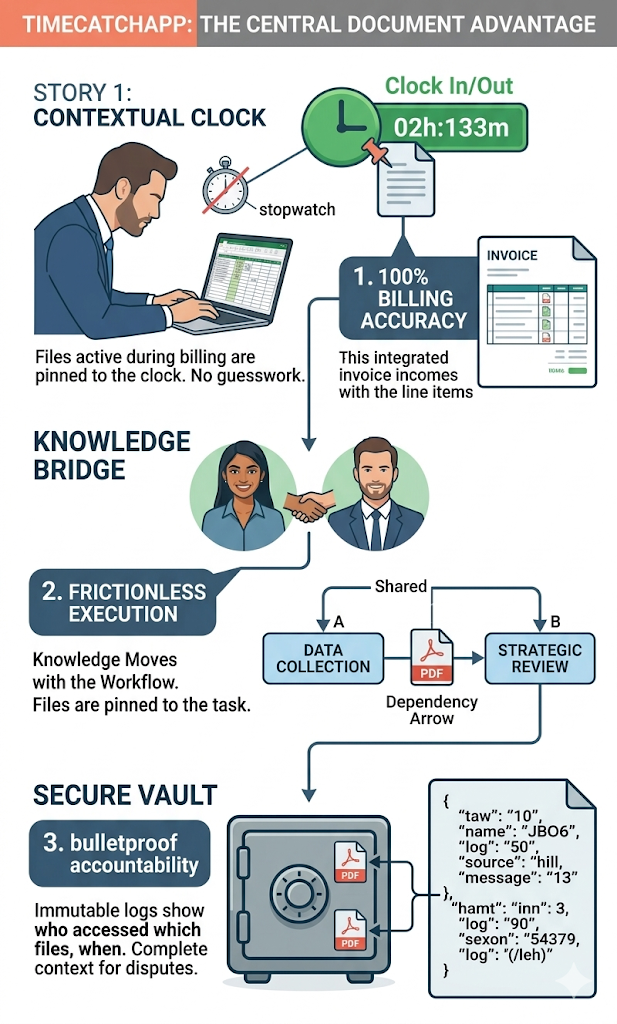
100% Billing Accuracy: The 'Context-Aware' Clock

When your documents and your time tracker are integrated, the 'Context Clock' knows what you are working on. There is no guessing which deliverable or research paper consumed that 2-hour billing block.

The Benefit: Total confidence in your billing statements. If a client queries an invoice, you can point directly to the exact files that were active during those hours

Frictionless Execution and Hand-offs

Imagine opening a complex data analysis task and finding the client's original dataset, the specific research requirements, and the analysis notes pinned directly to the interface. You don't have to navigate folders or search old email chains.

The Benefit: Maximum productivity. Work moves seamlessly between team members because the knowledge is embedded in the workflow, not trapped in an inbox.

Comprehensive Project Context

As a project evolves, versions change. By locking specific documents to specific tasks and timeline moments, you build an immutable record of how the project progressed.

The Benefit: Dispute protection. You can prove why a certain decision was made by showing the context (the documents and notes) active at that specific timestamp in the audit log.

Reduce IT costs and training

Your team members can use one system for time tracking, another for document management, a third for invoicing, another for communications. All working independently, with different actions, slowing you down. TimeCatchApp brings all of these into one, context-driven system.

The Benefit: No need to move data from one system to another, no loss of context, no wasted time moving translating between systems, no manual oversight. Saving you time and effort, allowing you to solve your customers' problems.

Definition

What Document Management Software Can Do For You

Document Management Software (DMS) is a digital ecosystem used to track, manage, and store project-related files, deliverables, and communications. For consultants, a high-performing DMS acts as a "single source of truth," moving beyond simple cloud storage (like a basic folder) to provide contextual organization.

In a professional services environment, this means your contracts, research data, client briefs, and final reports are not just saved; they are indexed and linked directly to the specific projects and billable tasks they support.

Linking tasks and sharing information
Cure Search FatigueDocs stored in context, always there
Secure DeliveryMore professional and secure than email
Knowledge TransferKnowledge transfer creates loss. DMS is self documenting.
Dispute ProtectionPrevent scope creep with integrated notes.
Data SecurityAccess controls for data privacy.
Use case

How Professionals Use Document Management Software

For a solo consultant or a small consulting firm, integrated document storage is the difference between a chaotic search for files and a streamlined, billable workflow.

Here is a high-level use case focused on the "Contextual Advantage," followed by the critical risks of operating without such a system.

The Use Case: The "Audit-Ready" Strategic Review

The Scenario: A boutique consulting group is hired to perform a Strategic Market Assessment. The project involves three distinct phases: Data Collection, Competitive Analysis, and a Final Executive Summary.

1. Contextual Onboarding (Frictionless Execution)

The lead consultant uploads the client’s raw data sets and the initial RFP directly to the "Data Collection" task in TimeCatchApp. When the Junior Analyst "clocks in" to start working, they don't have to hunt through email threads. The files are pinned to the timer.

The Benefit: This is contextual project management—ensuring the "source of truth" moves with the billable hour.

2. The Seamless Hand-off (Knowledge Retention)

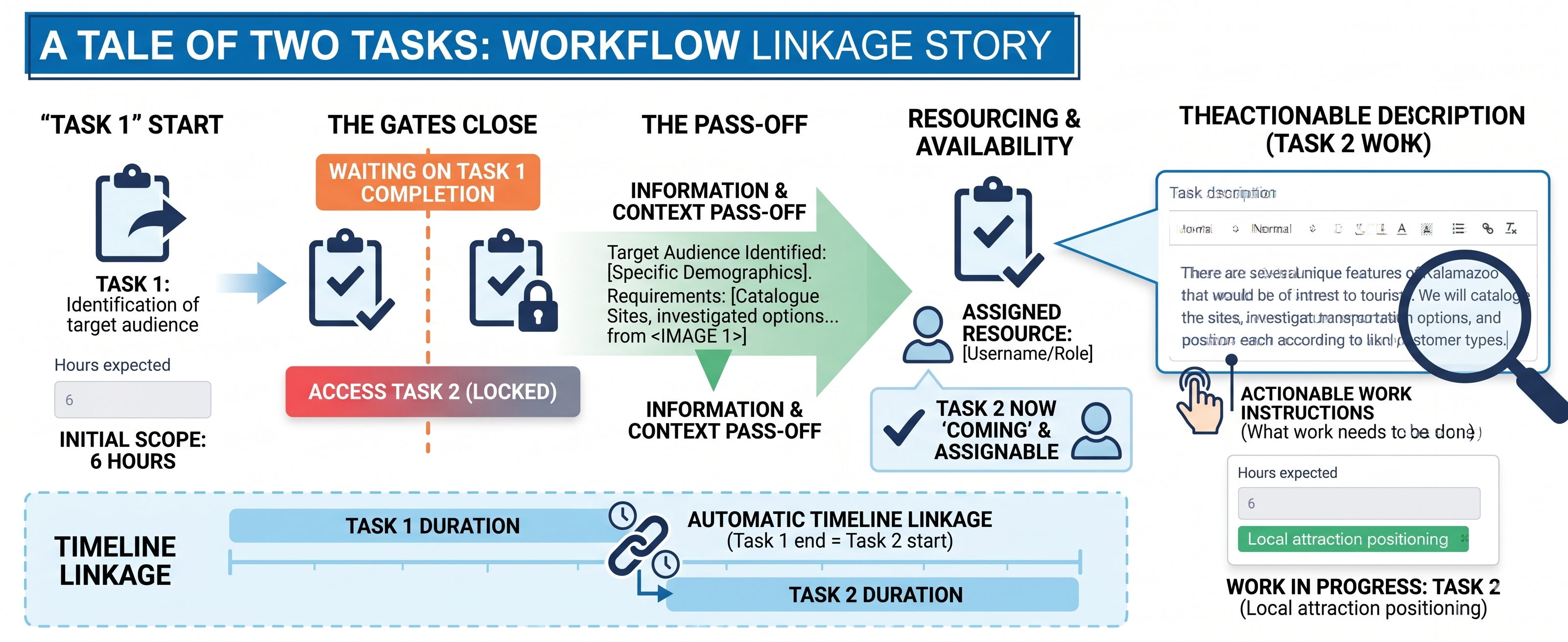
Once the Analyst finishes, the SME (Subject Matter Expert) clocks in for the "Competitive Analysis." Because the previous deliverables are attached to the preceding task in the workflow dependency, the SME has instant access to the analyst's findings.

The Benefit: This eliminates unbillable administrative friction and enhances team scalability.

3. The "Dispute-Proof" Invoice (Professional Accountability)

At the end of the month, the client is billed for 40 hours of work. If the client asks, "What exactly was done during these hours?" the consultant provides a report where each billable block is linked to the specific document version created or reviewed during that time.

The Benefit: This creates a bulletproof audit trail, fostering high levels of client trust and billing transparency.

Documents and notes stored in context

Integrated document storage within TimeCatchApp transforms your files from stand-alone, static data into active strategic assets. By linking your project deliverables directly to your task and all associated with it (internal direct messages, meeting notes, task description, billable clock, audit trail), you achieve workflow optimization, 100% billing accuracy, and enterprise-grade accountability.

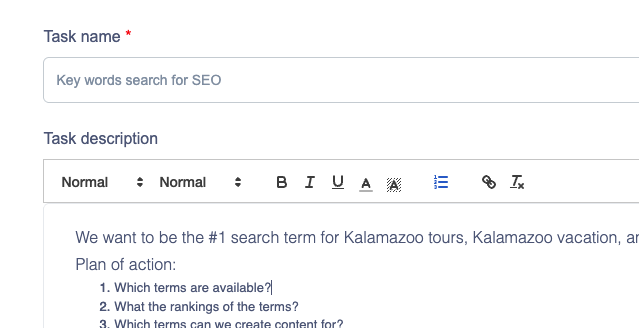
Description attached to task
Proposal-to-delivery information management

After work is approved, projects usually move through planning, assignment, execution, review, and completion. Document management software keeps all those proposal documents and planning notes available for when it is time to execute. If it is someone else, they have that information. If it is you weeks later, you will have the notes so that you do not need to rely on frail memory, but can deliver exactly what you proposed.

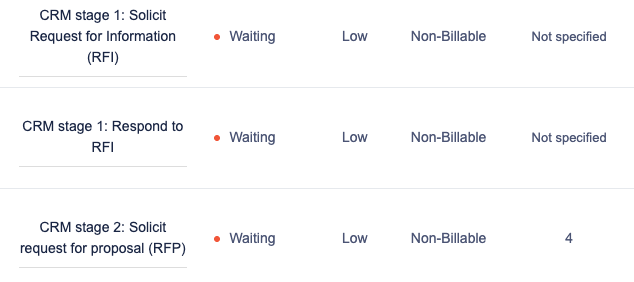
Screenshot of templated tasks linked in sequence
Secure Document Sharing

Attaching your documents to email messages and sending is not secure. This method has a high risk of being sent to recipients other than those intended, wastes your time by forcing you to find the document, find the right email, and send.

It is much easier to hit the send button. Or better yet, invite your client to the project and send them a direct message. The document never leaves the system, and you have full audit trail capabilities.

Screenshot of templated tasks linked in sequence
Document Available to Team

Everyone on the task will have access to the documents, and no one else. The task owner decides who has access and who does not. And you can always share the documents with others as needed. All in one integrated system.

Help Hint

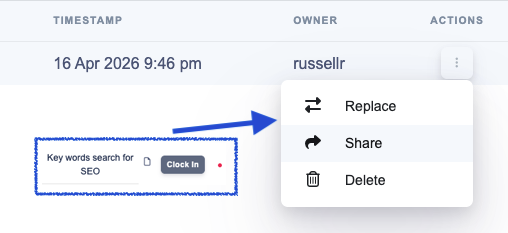
If you want a document shared with team members responsible for a downstream task, make sure you mark .

Share documents with successors
Feature grid

Core Workflow Software Capabilities

Task organization and prioritization

Structure works around what matters most, not just what appears first. Better prioritization curbs the tendency to react rather than plan, allowing for improved focus.

Start and due date notifications

Support stronger planning with better visibility into when work should begin and when it needs to be completed.

Task-level tracking

See what is moving, what is delayed, and where accountability needs to be reinforced at the task level.

Billable and non-billable visibility

Distinguish between work that supports revenue directly and work that supports delivery behind the scenes.

For teams that want tighter visibility into how work is performed alongside task progress, a dedicated time tracking tool can help connect workflow activity with actual hours spent.

Team communication

Keep more of the work context connected to the work itself so teams can reduce confusion and maintain momentum.

Connected operations

Bring workflow into a broader operating environment that also supports time tracking, documents, and invoicing.

When teams need supporting files, notes, and project materials to stay connected to active tasks, document management software can help keep workflow context more organized and accessible.

For service-based teams, workflow management becomes even more useful when completed work can flow more cleanly into invoicing software that supports billing and financial follow-through.

Helpful content

Helpful Workflow Practices For Professional Teams

Define Responsibilities Early

Clear ownership makes it easier to reduce bottlenecks and keep tasks moving through the right sequence.

Keep Workflows Simple

Overly complicated setups create friction. Start simple, then refine based on how teams actually work.

Build Repeatable Routines

Recurring work becomes easier to manage when the same steps, timing, and responsibilities are visible each time. Even outside software, process-flow improvements have long been associated with productivity gains. NIST’s process flow productivity example offers a useful real-world reference point on how better process design can support efficiency.

Distinguish Between Billable and Non-Billable Work

Both financial awareness and operational visibility can be enhanced by comprehending the nature of the work being executed. Additionally, this invoice automation software guide is available to teams seeking a more comprehensive operational perspective on invoicing efficiency, exceptions, routing, and approvals.

Keep Files Attached To The Work

Tasks become easier to manage when the supporting documents and project context stay connected.

Review Work Before It Stalls

Small delays become bigger delivery problems when bottlenecks are not visible early enough.

Platform information

Workflow Management as Part of a Connected Operating System

For service-based teams, workflow management becomes more valuable when it connects to the rest of the work environment professionals already need. Bringing time tracking, document management, and invoicing into one workflow platform creates a more streamlined system that boosts productivity.

Time Tracking

Track time spent on work projects clearly with the time tracking tool.

Document Management

Ensure that project files, notes, and supporting materials are organized using document management software.

Invoicing

Create a cleaner path from completed work to billing with invoicing software.

Workflow Management

Organize tasks, priorities, accountability, and communication in one workflow management system.

Why it may be a good fit for you

Why Timecatchapp is a Great Solution For Professionals

Consultants, freelancers, and small teams usually do not need heavyweight process software that tend to overcomplicate processes. They need simple workflow management software that is easy to use, clear to manage, and strong enough to support real client work.

That means the right platform should make task flow easier to follow, support priorities and deadlines, improve accountability, fit task-based service delivery, and give teams more visibility into what is happening now.

TimeCatchApp is built around those kinds of needs. That makes it a strong fit for individuals and teams looking for small business workflow management software and workflow task management software without unnecessary complexity. Consultants evaluating how workflow structure, time visibility, and client accountability work together may also find this article on consultant time tracking helpful.

  • ✓Practical for consultants, freelancers, and small teams
  • ✓Supports day-to-day delivery without unnecessary complexity
  • ✓Fits task-based work that needs visibility and accountability
Try It Free
User Testimonial

I've tried several time tracking tools and this one stands out above the rest of them! Their interface is easy to use, as well as advanced technical capabilities like invoicing and document management. This tool helps me get my work done seamlessly and stay organized.

Support content

Resources

Time Tracking Guide

Discover how time tracking helps teams stay organized, improve accountability, and manage work more efficiently.

Learn More

Invoice Software Guide

Learn how invoicing software simplifies billing, supports faster payments, and keeps financial workflows moving.

Learn More

CRM Software Guide

Explore how CRM software strengthens client relationships, centralizes communication, and supports a smoother workflow.

Learn More
FAQ accordion

Still Have Questions? We Have Answers!

What is document management software?

Document Management Software (DMS) is a digital ecosystem used to track, manage, and store project-related files, deliverables, and communications. For consultants, a high-performing DMS acts as a "single source of truth," moving beyond simple cloud storage (like a basic folder) to provide contextual organization

What are some risks of not using document management software?

Operating with disconnected tools (e.g., tracking time in Excel and storing files in a separate Dropbox or local folder) creates several "invisible" costs that hit your bottom line:

1. Billable Leakage (The "Search" Tax)

Studies show consultants spend up to 20% of their time just looking for information. If you spend 15 minutes finding a file before you start a task, and you don't track that search time, you are losing thousands of dollars in unrecorded billable minutes every year.

2. Version Control Catastrophes

Without integration, it’s easy to clock hours working on the wrong version of a client document. This lead to costly rework and damages your professional reputation when outdated data makes it into a final report.

3. The "Context Gap" during Disputes

If a client questions an invoice three months later, can you prove which research paper or dataset you were analyzing during a specific 4-hour window? Without integrated logs, you lack the evidentiary context needed to defend your fees, often leading to forced discounts or write-offs.

4. Security & Compliance Risks

Storing sensitive client data in unlinked, generic cloud folders increases the risk of data being shared with the wrong people. For consultants in regulated industries (like Life Sciences or Finance), lacking a secure, audited document ecosystem can disqualify you from high-value contracts.

5. Onboarding Friction

When a small firm grows, a lack of integrated storage makes it impossible for a new hire to understand the "why" behind a project. You end up spending hours in unbillable meetings explaining project history that should have been self-documented in the workflow.
What classes of documents are stored in document management system?

Document classes are designed to facilitate your work as a consultant, freelancer, or service provider. These classes are:

Attached documents

his would include spreadsheets, Word documents, etc. The file is stored in an encrypted drive and accessible through the user interface. Access is controlled by the owner of the task or project. Stored at task or project level.

URLs

This would include spreadsheets, Word documents, etc. The file is stored in an encrypted drive and accessible through the user interface. Access is controlled by the owner of the task or project. Stored at task or project level.

Description

The description is written in a rich text format within the task or project editing dialog. This is very useful for tracking meeting notes, work plans, etc. Easily accessed by all who have access to the task or project, and no one else.

Notes

Similar to Description, but meant to be updated on a regular basis.

Communications

Use the internal communicatino system. Similar to Slack, except all messages are archived in the appropriate project or task level for future reference. Available to all who have access to the project or task, and no one else. The messages are never deleted, so that you look up past decision processes.

Can you share documents with clients through the application?

Yes. We recommend you sign up the client for a free Client account, and then give them access as a user of the task. You will thank me for this later.

Are actions to documents captured in the audit trail?

Yes, but check the plan details for what actions are captured. Audit trails always capture who, what, and when, and are immutable.

The app works best on Google Chrome, Brave, Firefox, Edge and similar browsers.
You might see problems on Safari. We recommend you switch to a compatible browser from the list above.

Logo
v1.7 (What's new)

TimeCatchApp

  • Time Tracking
  • Project and Document Management
  • Workflow Management
  • Invoicing
  • FAQ
Company
  • Our Team
  • Contact Us
  • Blog
  • LLM Info
Connect With Us

© TimeCatchApp LLC | Data Privacy | Terms of Service

Marketing services by Logo
No Active Clock Found!
Clocked out successfully!
This clock will be discarded due to rounding off rules. Continue?
Clock discarded successfully!