Core Solution
Team Management Software That Makes Workforce Changes Easy
Add consultants, contractors, and employees in minutes. TimeCatchApp team workforce software helps consulting firms adapt quickly as projects, clients, and workloads change.
TimeCatchApp connects team members, tasks, time tracking, project documents, and invoicing into a single shared environment — so internal staff, freelancers, and consultants can collaborate on your projects. Expand your team from 1 to 50 in minutes, with no overhead cost. Scale up the easy way!
- Instant onboarding, zero friction
- Unified reporting, independent practices
- Flexible resourcing that scales with client work
- Connected tasks, time, documents, and invoicing
- Practical for consultants, freelancers, and small teams
See it in action
Internal staff and external experts, working from one project view.
Team members added in seconds, time logged against shared tasks, and every action captured in the same audit trail — regardless of employment status.
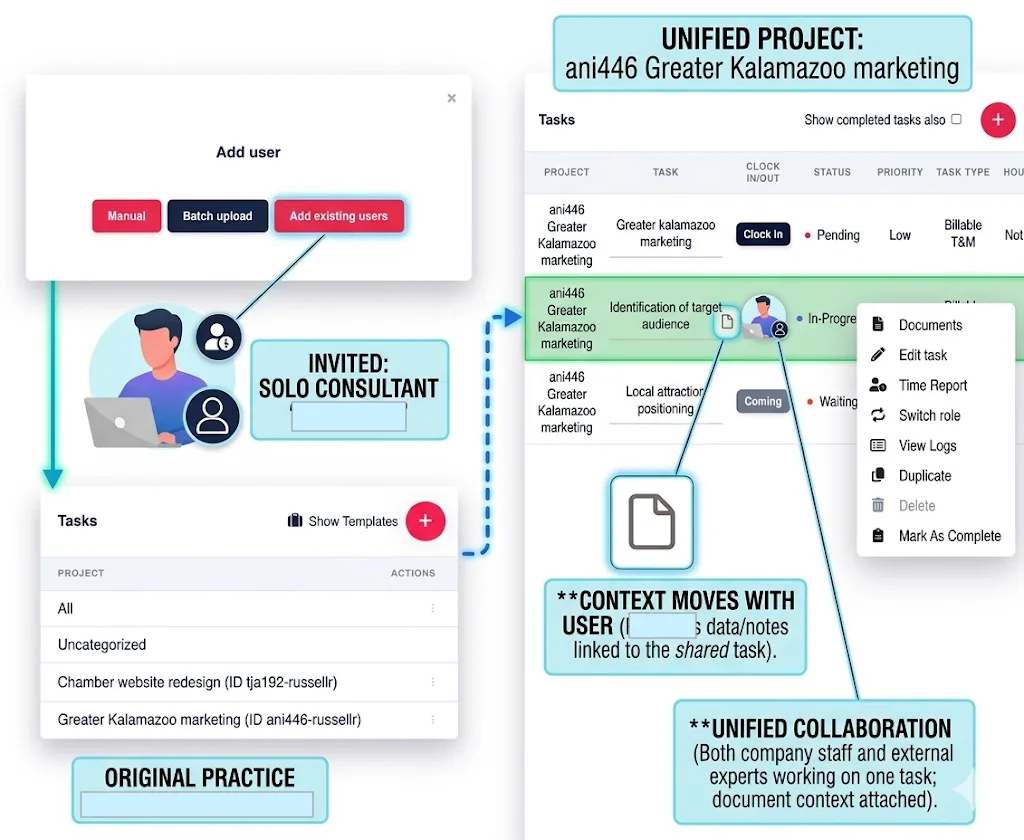
A basic team platform lists tasks. Connected team management software helps professionals coordinate people, deadlines, documents, time, and invoicing. This way your whole team sees the same version of the work.
The hidden cost of growing a team
Every Break in Your Workforce Has a Price. We Call It the Continuity Tax.
Every consultant you bring on, every new hire you onboard, adds another login to manage, another status update to chase, another place work can get lost. That's not just an HR headache. It's billable capacity leaking out of your firm every week.
New Login, New Everything
Every consultant or new hire needs their own accounts, folders, and threads set up before they can do a single hour of billable work. TimeCatchApp's Add Existing Users feature puts them on the project in seconds, using the accounts and folders that are already there.
The Status Chase
Managers spend hours pinging email, chat, and spreadsheets just to find out who's doing what right now, and whether it's on track. The Project Time Report shows live status for the whole team, so nobody has to ask.
Re-Explaining the Project
Every handoff between an employee and a contractor means someone has to stop and retell the story from scratch. Notes, files, and communication live inside the task itself, so a new contributor can read the history instead of asking for it.
The Vanishing Contributor
When a consultant's engagement ends, their history, files, and context often walk out the door with them. The Immutable Audit Trail keeps every entry and decision on the project long after they're gone.
People-first overview
Team management software that keeps a growing team from fragmenting.
TimeCatchApp helps consulting firms bring internal staff, freelancers, and independent specialists into the same project environment without adding unnecessary administrative work.
Zero-Friction Onboarding
Add an existing TimeCatchApp user to a project team in seconds without creating redundant accounts or introducing another system. This flexibility makes it practical as small-team management software for firms that scale expertise in response to changing client needs.
Unified Reporting
Keep project progress, logged time, financial reporting, and supporting documents connected in one place. External consultants can contribute alongside internal staff while continuing to operate as independent business owners.
Accountability for Hybrid Teams
Record project activity within the Immutable Audit Trail so clients can receive a clearer account of work performed across the entire team. This transparency also supports the needs of remote team management software for contributors working across different offices or organizations.
Flexible Resourcing
Add or remove specialized contributors on a per-project basis, enabling boutique firms to pursue larger engagements without incurring the fixed overhead of a permanently expanded team. This is the flexibility that effective business team management software tools should provide.
How it works
Connected team management software: one system for tasks, time, documents, and invoicing, no matter who's on the team.
The platform organizes work by projects and tasks, with tasks arranged into hierarchies where completing one triggers the next. Time tracking, documentation, notes, and communication live inside the same system. No need to move data. No room for errors or missing information. All information retains its context.
- Assign work and clarify responsibility
- Track time against tasks and projects
- Store project files and communication in context
- Report on billable and non-billable work
- Invoice from work already tracked automatically
See the broader TimeCatchApp platform.
Use case
Team management software in action: how one boutique firm builds a Virtual Agency without the Continuity Tax.
The Scenario: A boutique consultancy wins a large-scale Clinical Trial Data Audit. The firm owner brings in two independent consultants — a Biostatistician and a Quality Compliance Officer — to work with an internal Junior Analyst.
Instead of setting up new email servers or separate project logins, the firm owner uses "Add existing users." Within minutes, both experts are on the "Clinical Trial" project with the same task access, "Clock In" accountability, and reporting as any employee.
The owner sets a dependency: the Biostatistician cannot start "Final Analysis" until the Compliance Officer uploads the "Regulatory Framework" document. This is where team task management software matters — ownership, dependencies, and documents stay connected.
As the Biostatistician clocks in, billable hours appear instantly on the firm's Project Time Report. The owner sees the burn rate live. A connected time tracking tool is what makes it double as team time management software.
One invoice ships to the client with all hours itemized. Connecting completed work to invoicing software creates a clean path from project activity to client billing — and the small firm looks like a fully staffed enterprise.
Getting started
Onboarding that treats consultants and employees exactly the same.
On the Management tab, click into your company, select users, and add. Existing users → "Add Existing Users." New users → "Manual" (1–2 people) or "Batch Upload" (CSV template provided). Users accept, and you're collaborating — it's that easy!
Onboarding is so simple anyone on the team can do it. Don't pay for more administration. If you are hiring employees, check out the SBA guide to hiring and managing employees for legal information. The SBA guide to hiring and managing employees is a broader reference on the operational and legal side.
Three onboarding paths — one system, no redundant accounts.
Feature set
Team management software: know who's doing what, what's billable, and what happened, all in one place.
Every team member gets access to the same tools. From teams of 1 to 1000. Task communication stays in context, so project discussion doesn't get buried in unrelated email threads. These features make team task management software useful in real client work.
| Capability | What It Does | Best For |
|---|---|---|
| Task organization & prioritization | Structures work around what matters most | Reducing reactive work |
| Start & due date notifications | Visibility into when work should begin and end | Reducing manager follow-up |
| Task-level tracking | Shows what's moving, delayed, or stalled | Team project management software use cases |
| Billable / non-billable visibility | Separates revenue-supporting from delivery work | Financial clarity |
| In-context team communication | Discussion stored with the task for the life of the project | Remote and hybrid contributors |
| Connected documents | Files linked to active tasks and workflows | Reducing scattered file storage |
| Immutable audit trail | Complete record of activity, changes, and time | Client accountability |
The same visibility helps teams evaluate how their current system stacks up against other productivity platforms. Firms comparing options can review the side-by-side comparison to better understand the strengths and weaknesses of each solution.
Team types
The team management software that helps a small consulting firm operate like a much larger one, without the overhead.
Whether your team is in-house, remote, distributed, or built from outside specialists, everyone works from the same tasks, time, and documents, so a five-person firm can look and run like a fifty-person one.
| Team Type | Where It Fits |
|---|---|
| Consulting & professional services | Team project management software for coordinating employees, subject-matter experts, and outside specialists on client engagements. |
| Remote & distributed teams | Remote team management software that gives contributors shared access to tasks, deadlines, documents, and logged work from anywhere. |
| Small teams & boutique firms | Small team management software for firms that need clarity without enterprise-level administrative overhead. |
| Client-focused delivery teams | Post-sale delivery coordination — not a CRM that ends with the sale. Businesses evaluating sales team management software should pick based on where the actual delivery work happens. |
| Software & technical teams | Software team management with task ownership, dependencies, documents, and time visibility for engineering-adjacent work. |
The U.S. Bureau of Labor Statistics' American Time Use Survey reports that about 35% of employed people worked from home for at least part of the day on days they worked. For teams operating across multiple locations, remote team management software can help keep tasks, documents, and logged time visible in a single shared system.
Helpful content
Team Management Practices for a Flexible Workforce, Built Into TimeCatchApp.
Define Responsibilities Early
TimeCatchApp assigns an owner to each project and to each task within it, plus a simple approval process for every deliverable, so responsibility is clear from day one, no matter who's on the team.
Keep Processes Simple
From changing owners to editing the project as needed. Communication stays with the task, not in a complicated system of emails, DMs, and cloud storage links.
Build Repeatable Routines
Turn a standard engagement into a reusable project template, so the next time you staff a similar project, the steps, tasks, budgets, and standard documents are already there. Just click on Use Template and you have a full project ready to execute.
Keep Files With the Work
Bundles documents, messages, and notes together with the task description, so you can find it today, tomorrow, next year.
Use Actual Time to Improve Future Planning
Deadlines say when work should happen. Team time management software shows how long it actually takes, so estimates get sharper over time.
Platform information
Team management as part of a connected operating system that closes your Continuity Tax gaps.
The platform brings time tracking, workflows, project documents, communication, reporting, and invoicing into a single operating system for client work, connected no matter who's on the team.
Time Tracking
Every internal and external hour lands in the same system, so nothing has to be reconciled later, no matter who logged it.
Document Management
Files and notes stay with the task itself, so a new consultant sees the same context an employee would, without a separate onboarding packet.
Workflow Management
Task owners, dependencies, and communication stay linked no matter who's assigned, so handoffs between employees and consultants don't need a status meeting.
Invoicing
Outside consultants' billable hours flow into the same invoice as your own team's, automatically, so nothing gets left off the bill just because it came from someone outside the firm.
Ready to grow your team without growing your Continuity Tax?
Sign up for free
Why it may be a good fit for you
Why TimeCatchApp is the practical team management software for a flexible workforce.
Consultants, freelancers, and small teams can't afford heavyweight software. They need simple team management software — easy to use, clear to manage, and strong enough for real client work. It onboards contributors quickly, ties task progress to actual hours, keeps documents with the work, and lets completed activity flow into invoicing. That's how a boutique firm competes with a much larger team on delivery quality, without the fixed overhead. This guide to consultant time tracking explores how time visibility and client accountability work together.
- Practical for consultants, freelancers, and small teams
- Supports internal, external, hybrid, and remote contributors
- Connects tasks, time, documents, workflow, and invoicing
- Helps teams scale without unnecessary operational complexity
I've tried several time-tracking tools, and this one stands out above the rest of them! Their interface is easy to use, as well as advanced technical capabilities like invoicing and document management. This tool helps me get my work done seamlessly and stay organized.
FAQ accordion
Frequently asked questions about team management software.
Yes. External contributors log time in the same projects and reports, giving firms a single, consistent view of work across internal and external team members.
One system keeps communication, tasks, documents, time tracking, and invoicing connected while reducing the confusion caused by separate tools and disconnected workflows.
Yes. External consultants can invoice the hiring firm through the platform, and the relationship can also work in both directions on shared projects.
TimeCatchApp combines team project management software capabilities with connected tasks, time tracking, documents, communication, reporting, and invoicing for internal and external contributors.
Project files and activity stay within the project vault instead of being spread across emails, chats, and multiple cloud platforms, with off-site cloud backups.
The best team management software should offer clear task ownership, project visibility, remote collaboration, time tracking, and a strong fit for the team's delivery model.
Team management software that closes the Continuity Tax gap, whoever's on your team.
Bring internal staff, freelancers, and consultants into one shared environment — with connected tasks, time, documents, and invoicing built for consultants, agencies, and small teams.