
Audit Trail Software That Shows Exactly Who Did What, and When
Stop guessing who moved a file, changed a deadline, or sent an invoice. TimeCatchApp's audit trail software keeps an automatic, indelible record of every action, built into every project from day one.
Every action nobody can trace, a missing document, a changed deadline, a disputed hour, costs you time proving what happened and trust rebuilding after it. That's the Continuity Tax. TimeCatchApp's audit trail gives you a date, time, user, and action stamped on every entry, so instead of reconstructing the truth, you already have it.
- Automatic, indelible audit log on every account
- Two levels: Standard included free, Regulatory-Grade when you need it
- Organized by project, so it's always where you'd expect
We call it the Continuity Tax. It gets paid twice.
A consultant at a small firm needed a source document for a deliverable. It wasn't on the shared drive. The whole team scrambled, and after four hours of searching, with no billable work performed, it turned up in the wrong folder. No record of who moved it, when, or why. Without an audit trail, that kind of dispute costs you real hours and real trust, every time it happens.
Try It FreeEvery action stamped with who, what, and when, automatically.
The audit trail runs in the background on every TimeCatchApp account. Nothing to turn on, nothing to configure.
- Every covered action is logged automatically, system-wide
- Every entry shows exactly who took the action
- Every entry shows exactly what the action was
- Records are indelible, they cannot be edited or deleted after the fact
- Choose Standard coverage or step up to Regulatory-Grade
- Available by project and by task, so it's easy to find
An audit trail is not a screenshot. It never watches your screen.
We've said elsewhere that TimeCatchApp doesn't take screenshots, log keystrokes, or watch your screen, and that surprises some people once they see how much detail the audit trail records. The two are different tools with different purposes. An audit trail proves what happened. Screenshot monitoring watches what's happening. TimeCatchApp only does the first.
What the Audit Trail Records
Who took an action, what the action was, and the project or task it happened on, timestamped to the minute. Enough to answer a question or settle a dispute, nothing more.
What TimeCatchApp Never Records
No screenshots. No keystroke logging. No webcam or microphone access. No tracking of what's on your screen, only what you did inside TimeCatchApp.
That distinction is deliberate. Accountability shouldn't require surveillance. An audit trail gives you, your team, and your clients proof of what happened, without anyone needing to watch you work to get it.
"What truly sets TimeCatchApp apart is the unmatched flexibility it offers: there are no invasive screenshots, and you can close your browser without interrupting the timer."
Audit trail software that saves you time by giving you proof instead of guesswork.
Know Who Did What
See a clear record of who created, edited, shared, or deleted anything, so responsibility is never a guessing game.
Resolve Disputes Quickly
Settle questions about who did what, and when, in minutes instead of hours. The record already exists.
Stay Organized by Project
The audit trail lives with the project it belongs to, easy to find, always running in the background.
Choose Your Level of Coverage
Start with the Standard audit trail included free on every account, or step up to Regulatory-Grade when your industry demands it.
What an audit trail should do for you.
An audit trail exists to prove that responsibility for any output or action can be traced. It gives you, a future version of you, your customer, or a regulator, confidence that the work was done, that it was done by someone qualified to do it, and that the results were not altered afterward.
An audit trail, sometimes referred to as an audit log, should have the following characteristics:
- Runs automatically and cannot be disabled by a user
- Is indelible, records cannot be changed after the fact
- Provides a date and time stamp on every entry
- Provides a user stamp on every entry
- Indicates exactly what action was taken
TimeCatchApp's audit trail software has these characteristics built in to protect you. You will not need it every day, but when you do, it can save you hundreds of hours of work and thousands of dollars in disputed revenue.
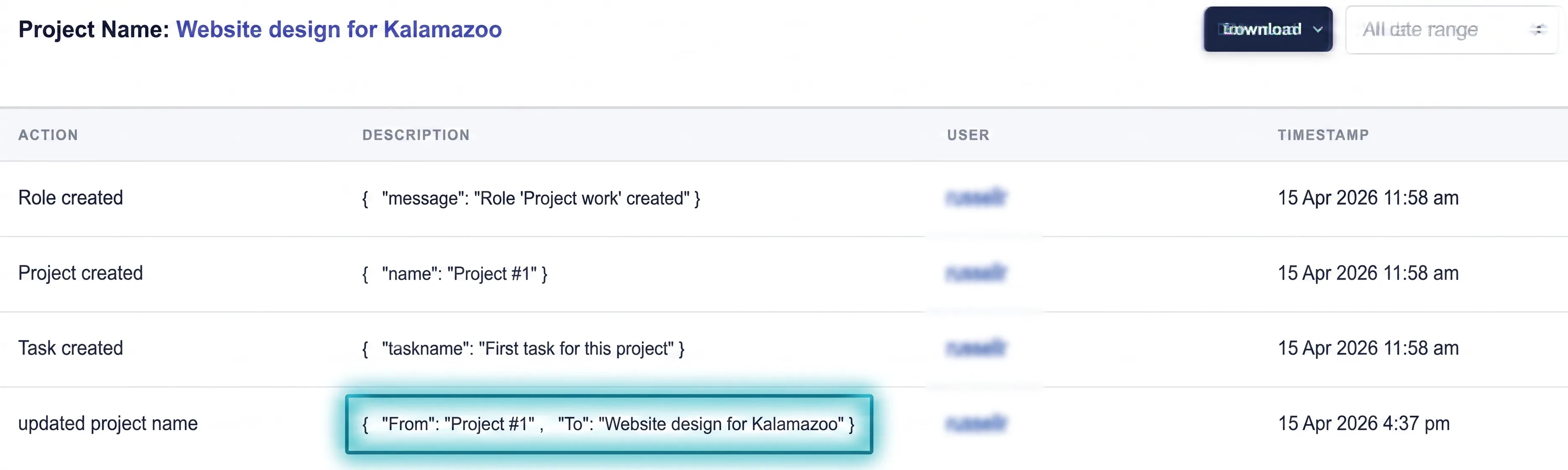
A single audit trail entry: what changed, who changed it, and exactly when.
Audit trail software in action: seven ways proof protects your business.
Audit trails are an important tool across many fields to maintain accountability, responsibility, and compliance with regulations, including in finance, drug development, and nuclear energy.
Finance, drug development, nuclear energy, and other regulated fields depend on audit trails to maintain accountability and demonstrate that work was performed correctly, by qualified people, without later alteration.
Audit trails provide verifiable documentation of how data and documents were handled, identifying exactly who created, modified, or deleted them, and confirming a document or transaction wasn't tampered with along the way.
A consultant needed a source document for a deliverable. It wasn't on the shared drive. The team spent four hours searching before finding it, misplaced, in another folder. Without an audit trail, there was no way to know where the document was, how it moved, or who was responsible. A centralized system with an audit trail would have resolved it in minutes.
Every TimeCatchApp account automatically tracks:
- Creating or deleting projects
- Creating or deleting tasks
- Sending or sharing documents and invoices
If you work in a regulated industry, the Regulatory-Grade tier tracks everything in Standard, plus:
- Document creation or deletion
- Edits to project parameters
- Edits to task parameters
- Adding or removing individuals from projects or tasks
- Company policy changes
- Changes in company memberships
Storing new documents, updating documents, sending invoices, and every other covered action is tracked in the audit trail automatically, in the background, giving sponsors and clients full transparency without adding a step to anyone's day.
Every covered action is tracked by project and by task, so you can review exactly what happened without sifting through a system-wide log to find it.
Core audit trail software capabilities.
Automatic logging
Your plan's covered actions are logged automatically, always on, from the start. Nothing to configure.
Task- and project-level tracking
Every covered action is tracked at the level it was made, so it's easy to find the log entry when you need it, without slowing down your system.
Indelible records
Once an entry is written, it can't be edited or deleted. That's what makes it trustworthy for an inspector, a client, or you.
Date, time & user stamps
Every entry answers three questions at once: what happened, who did it, and exactly when.
Two levels of coverage
Standard tracking comes free on every account. Regulatory-Grade adds deeper coverage for regulated industries.
Visible to all with access
No separate roles or permissions to manage. If you can see the project, you can see its audit trail.
Audit trail as part of a connected operating system that closes your Continuity Tax gaps.
A standalone audit log only tells you what happened in one place. When time tracking, documents, workflow, and invoicing all run through the same system, one connected audit trail covers every action across the entire engagement, nothing has to be pieced together from five different tools.
Time Tracking
Every clock-in and clock-out is captured in the audit trail automatically, so time records carry the same proof as everything else.
Document Management
File uploads, edits, and approvals feed directly into the same audit trail as the rest of your project activity.
Workflow Management
Task assignments, status changes, and approvals are tracked the moment they happen, no separate log to maintain.
Invoicing
Invoices sent, payments received, and terms changed are all recorded, so your billing history is as provable as your work history.
TimeCatchApp gives you big firm proof, without needing a compliance department.
Consultants, freelancers, and small firms rarely have a dedicated compliance or IT team to build and maintain an audit trail. They need one that runs itself, indelible, automatic, and organized by the project it belongs to, without adding a new system to manage.
That means the right audit trail should require no setup, scale from a free Standard tier to Regulatory-Grade coverage when the work demands it, and stay attached to the project so it's never something you have to go looking for separately.
TimeCatchApp is built around those needs. That makes it a strong fit for consultants, freelancers, and small teams who need real audit trail software, not a heavyweight compliance platform built for enterprises with dedicated audit staff.
Resources.
Time Tracking Guide
Discover how time tracking helps teams stay organized, improve accountability, and manage work more efficiently.
Learn MoreInvoice Software Guide
Learn how invoicing software simplifies billing, supports faster payments, and keeps financial workflows moving.
Learn MoreCalculators
Explore free calculators for overtime, currency conversion, utilization rates, and more, tools that pair well with accurate records.
Learn MoreStill have questions? We have answers!
Software that automatically tracks actions taken in a system, logging when the action happened, who did it, and what the action was. The resulting audit log is indelible, so it stays trustworthy for evaluating the quality of your work.
Most software has some audit trail capability on its own, who touched a file, a date stamp, and so on. But if you work across multiple systems, you end up with a separate audit trail in each one, with no connection between them. One integrated system means every action is tracked in a single place, with nothing left out by accident.
Everyone doing client or regulated work. The alternative, no audit trail, means wasted time, inspectors asking more questions, and potential fines for nonconformance with regulations.
On a traditional shared computing resource, it can. TimeCatchApp is built to keep the impact effectively unnoticeable, the audit trail runs continuously in the background without slowing down your work.
The terms are often used interchangeably. An audit log is the record itself, the list of entries. An audit trail is the connected history you can follow from one entry to the next. TimeCatchApp gives you both, a detailed audit log for every project, organized into a full audit trail you can review end to end.
Audit trail software that closes the Continuity Tax gap between what happened and who can prove it.
Get an automatic, indelible record of who did what, and when, for every project. Free on every account, with Regulatory-Grade coverage when you need it.