TimeCatchApp
Please wait
TimeCatchApp logo
  • Platform
    💼
    Software for Consultants

    Time, documents, approvals, and billing for your practice.

    ⏱️
    Time Tracking

    Automated logs & billables.

    📂
    Document Management

    Secure vault for all files.

    🔄
    Workflow Management

    Automate repetitive tasks.

    💳
    Invoicing & Finance

    Proposals to payments.

    👥
    Team Management

    Onboard anyone. See who's doing what.

    📋
    Audit Trails

    Full transparency & compliance.

    ✅
    Approval Manager

    Sign-off attached to the file.

    🤝
    Client Approval Software

    A definitive stamp, not an email.

  • Resources
    📉
    Why Firms Lose Margin

    Where profit leaks between disconnected tools.

    ✍️
    Blog

    Insights on scaling your consultancy.

    🧮
    Calculators

    Overtime, currency, utilization, and more

    🎬
    How-to Videos

    Master the platform in minutes.

    📘
    The Book

    Metrics that predict profitability.

    ⚖️
    Comparisons

    See how we stack up.

    🚀
    What's Coming

    See what we're building next.

  • Pricing
  • Login
  • Create Trial Account
TimeCatchApp
🧭
Platform Overview

Everything in one connected system.

💼
Software for Consultants

Time, documents, approvals, and billing for your practice.

⏱️
Time Tracking

Automated logs & billables.

📂
Document Management

Secure vault for all files.

💳
Invoicing & Finance

Proposals to payments.

👥
Team Management

Onboard anyone. See who's doing what.

📋
Audit Trails

Full transparency & compliance.

✅
Approval Manager

Sign-off attached to the file.

🤝
Client Approval Software

A definitive stamp, not an email.

📉
Why Firms Lose Margin

Where profit leaks between disconnected tools.

✍️
Blog

Insights on scaling your consultancy.

🧮
Calculators

Overtime, currency, utilization, and more

🎬
How-to Videos

Master the platform in minutes.

📘
The Book

Metrics that predict profitability.

⚖️
Comparisons

See how we stack up.

🚀
What's Coming

See what we're building next.

Pricing Login
Create Trial Account
Client Approval Software

Client Approval Software That Gets a Definitive “Approved”: Not Just an Email

Client approval software gives your client or your manager a real, recorded way to say yes before the documents, the plans, the outputs, are finalized. The approval is attached to the document itself so you don't have to hunt it down, so that you have certainty with a clear yes/no. You avoid the reply-all thread that means different things to different people two months later. You can get a client's approval over email today, but the only real advantage email has is that everyone already uses it. It was never built to be the record of what was approved, when, or by whom. See why that gap matters →

Try It Free 14 days, no credit card required Why Email Isn't Enough →
  • Client accounts free on every plan: no seats, no per-reviewer charge
  • A definitive approval stamp, not an inferred one
  • Every review, comment, and approval logged automatically
  • Tied to your audit trail: see how →
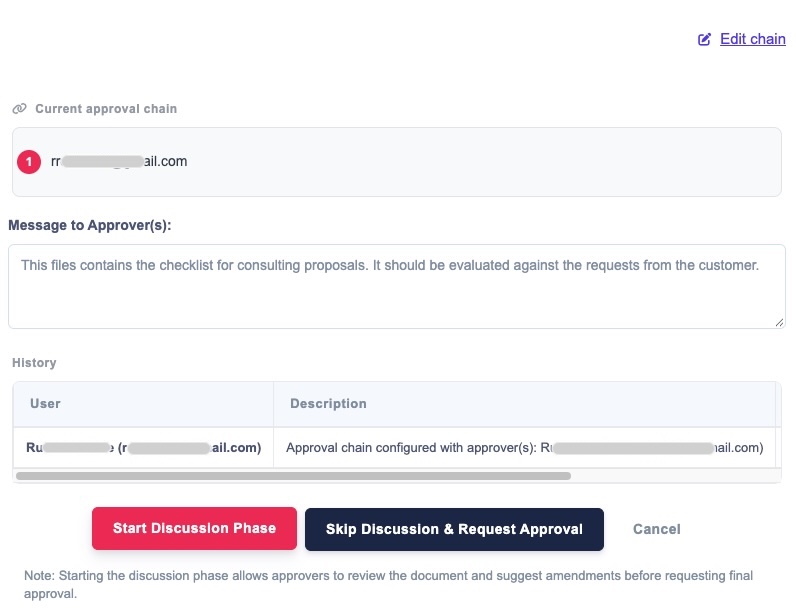
Approval Chain · Kalamazoo Marketing Plan
Approval chain ready to start review
The gap

“Sent” Isn't the Same as “Approved”

A large service provider delivered a $400,000 deliverable to a client. The client replied by email: “This looks good.” Two months later, the client came back wanting changes. The provider said that would require a change order, since they'd assumed the email meant the client had signed off. The client said no, and insisted the change was part of the original scope. With nothing more definitive than “this looks good” in an inbox, the provider had no ground to stand on. They ate an extra $40,000 in unbudgeted work.

A definitive approval stamp, not an inferred one, would have settled this before it started. That's the entire difference client approval software makes.

What “Looks Good” Cost Them
$40,000
unbudgeted work eaten because an email couldn't settle what was actually approved
What Would Have Prevented It
One Stamp
a definitive, recorded approval tied to the exact version delivered
Why not just use email?

Email Isn't a Strawman. It's Just Missing Four Things.

Everyone already has email. No setup, no new login, no learning curve for the client. That's a real advantage, not a strawman, and it's the reason email is still how most approvals happen. But it comes with at least the four costs below that only show up once something goes wrong.

It isn't a system. It's a screenshot away from being lost.

Approval by email means someone has to manually copy that email into whatever actually tracks the work: a doc, a spreadsheet, a project file. That only holds up as a habit on low-value work. The moment a deliverable is worth $400,000, “I'll paste it in later” isn't a process.

Email is genuinely hard to find later.

Three months on, “which email had the approval in it” is a search through an inbox, not a lookup, and there's no guarantee that search will be successful. Compare that to an approval that lives attached to the deliverable itself, permanently.

It's invisible to everyone who wasn't cc'd.

A teammate who steps in later, a second reviewer, or you six months from now: none of them can see an approval that lived in one person's inbox unless someone thought to forward it at the time.

It doesn't track versions or changes.

If a deliverable changed after the “looks good” email went out, email has no way to tie the approval to which version was approved. That's the real gap that causes disputes, not “did they approve it,” but “did they approve this exact one.”

Client approval software fixes this by keeping the approval attached to the work itself, not a separate inbox that only one person can search.

Pricing, honestly

Free Client Accounts, Not Paid Seats

Client approval, and every client account feature that comes with it, is included free on every TimeCatchApp plan. No seat count, no per-reviewer charge, no upgrade required to add a client as an approver. That's a deliberate contrast with how the rest of this category prices client access.

Provider Cost to Add a Client as an Approver
TimeCatchAppFree, on every plan
Scoro$17–57 per user/month, 5-seat minimum — a client reviewer counts as a seat
AcceloRoughly $20–90 per user/month on a custom quote — same story, every reviewer is a paid seat
BigTime$20–45 per user/month per seat

Figures reflect published pricing as of this writing; confirm current rates on each provider's own site before deciding. See the full breakdown on how TimeCatchApp compares.

Add a client to any of these as an approver and you're paying for the privilege of getting your own invoice approved. TimeCatchApp's client accounts don't work that way: a client gets their own login, sees only what they need to review and approve (not your internal project, task list, or team communication), and it costs nothing, on any plan, no matter how many clients you add.

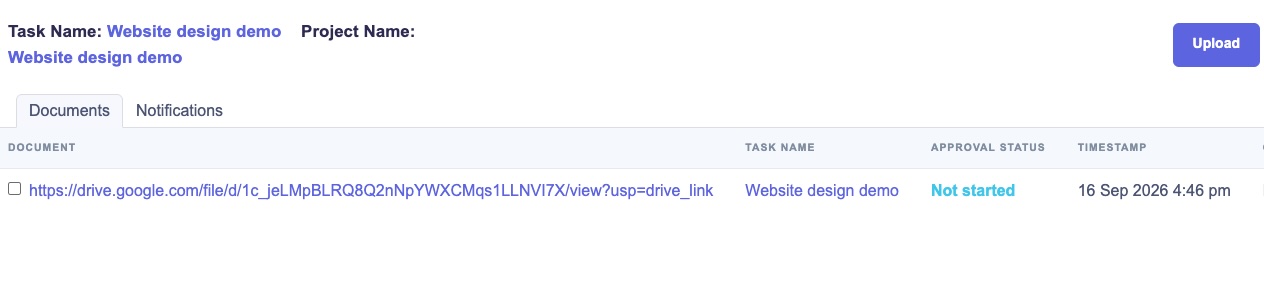
Client-visible document and approval status view
Best practices

Setting Up an Approval Chain

Here's how a typical approval workflow works in TimeCatchApp, from storing the document through final sign-off.

  1. 1

    Store the document where the work lives. If it's tied to a task, store the document (or a link to it) in that task. If it's project-wide, store it in Project Documents. If your files live in Google Docs or elsewhere, just store the link. Your files can stay exactly where they are.

  2. 2

    Set up your approval chain. A common order is QC, then senior review, then manager, with the client last. Once you set this up, the next document you send for approval inherits the same chain by default, and you can edit the chain at any time.

  3. 3

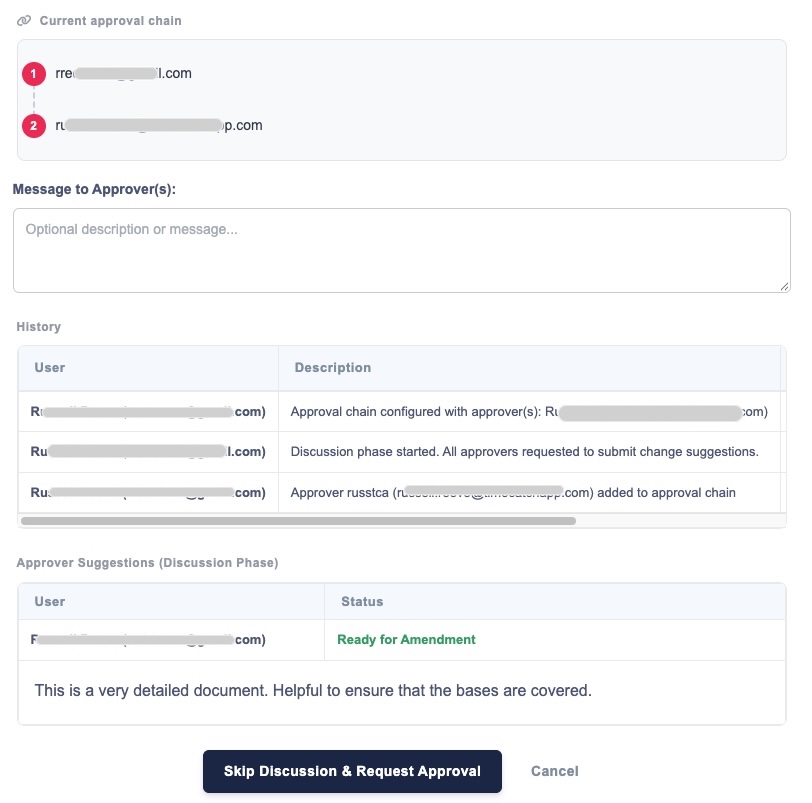
    Send for review and comments. Everyone on the chain reviews and comments in one shared place. No side conversations, no confusion about who said what.

  4. 4

    Address the comments, then send for approval. TimeCatchApp emails each approver in sequence: an approver only gets notified when it's actually their turn, not before.

  5. 5

    If an approver rejects it, you get a new task with their comments attached. Edit the document (which creates a new version), and restart the process from there.

  6. 6

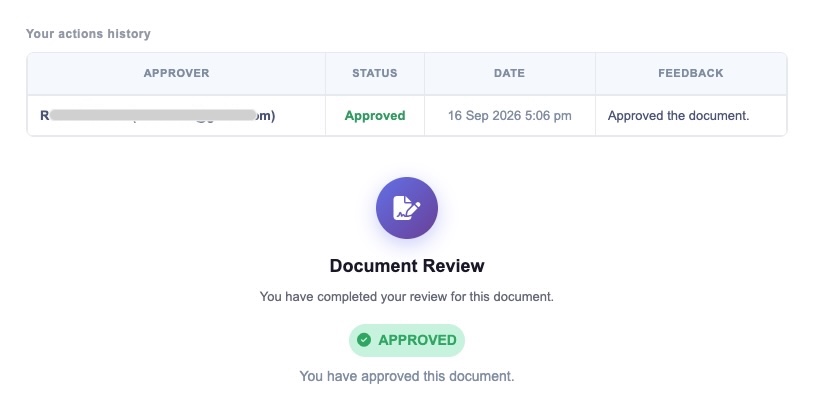
    Once the last approver in the chain approves, the document is labeled Approved. Every step along the way (every review, comment, and approval) is recorded in the approval log, visible to everyone on the chain.

This is also where the version problem from the email comparison above gets solved directly: each approval ties to the specific version that was reviewed, so there's never a question of which draft someone actually signed off on.

Your browser doesn't support embedded video. Download the walkthrough instead.

A screen recording walking through setting up an approval chain, start to finish.

Discussion phase with approver comments and suggestions
The discussion phase, with approver comments and suggestions in one shared place.
Approval log showing completed, timestamped approval
The approval log: a completed, timestamped record anyone on the chain can see.
Tied to your audit trail

One Continuous Record, From Approval to Billing

Once a document is approved, that record locks and feeds directly into the same indelible audit trail TimeCatchApp uses to defend your invoices. It's not a separate log you have to reconcile later. It's one continuous record from approval to billing. See how the audit trail settles a billing dispute →

Client approval vs. internal approval

Two Approval Chains, One Continuous Record

This page covers external, client-facing sign-off on deliverables. If what you need is approval workflow software for internal chains, review and sign-off within your own team, no client involved, that's Document Approval Software: built on the same idea as tools like Salesforce's approval chains, but a lot simpler to set up and use. Many teams use both: internal review first, client approval last, as one continuous chain.

Internal

Document Approval Software

Team review and sign-off within your own organization: QC, senior review, manager. No client involved. See Approval Manager →

Client-facing

Client Approval Software

The same chain, extended out to the client as the final, definitive approver, with a free client account and no seat cost.

FAQ

Common Questions About Client Approval Software

Client approval software gives a client a real, recorded way to review and approve a deliverable: a definitive “approved” stamp tied to a specific version of the work, rather than an email reply that can mean different things later.

Email works until something's disputed. It's not a system of record, it's hard to search months later, it's invisible to anyone not on the thread, and it can't tie an approval to a specific version of a deliverable. See Why Not Just Use Email? above.

No. Client accounts, and everything needed for a client to review and approve work, are included free on every TimeCatchApp plan: no seats, no per-reviewer cost.

They can comment and request changes as part of the review step before anything goes out for final approval, and can reject at the approval step, which opens a new task with their comments attached.

Each time a document is edited after a rejection or a round of comments, it creates a new version. Approval is always tied to the specific version that was sent, so there's a permanent record of exactly which draft was approved.

It works alongside it. Approval Manager (Document Approval Software) handles internal review chains within your team; Client Approval Software extends that same chain out to the client as the final approver.

Yes. Every review, comment, and approval is logged automatically and feeds into the same audit trail used to defend invoices and settle disputes.

Every plan. Client accounts and client approval are free on all account levels. See pricing →

Get a definitive “approved,” not an email you have to interpret.

Client accounts are free on every plan, no seats, no per-reviewer charge. Start with a 14-day free trial.

Try It Free 14 days, no credit card required See Internal Approval Chains →

The app works best on Google Chrome, Brave, Firefox, Edge and similar browsers.
You might see problems on Safari. We recommend you switch to a compatible browser from the list above.

Logo
v1.8 — What's new

TimeCatchApp

  • Platform Overview
  • Time Tracking
  • Project and Document Management
  • Workflow Management
  • Invoicing
  • Client Approval Software
  • Software for Consultants
  • FAQ
Company
  • Our Team
  • What's Coming
  • Contact Us
  • Blog
  • LLM Info
Comparisons
  • All Comparisons
  • vs. Scoro
  • vs. Accelo
  • vs. Productive
  • vs. BigTime
  • vs. Kantata
  • vs. Google Docs & Dropbox
Connect With Us

© TimeCatchApp LLC • Privacy Statement • Cookie Policy • Cookie Preferences • Terms of Service

Marketing services by Citypeak Marketing
Toggle time clock widget
No Active Clock Found!
Clocked out successfully!
This clock will be discarded due to rounding off rules. Continue?
Clock discarded successfully!

Your cookie choices

We use strictly necessary cookies to run this site. With your permission, we'd also like to use analytics cookies to understand how the site is used, and functional cookies to run our chat assistant. You can change your choice at any time from Cookie Preferences in the footer. See our Cookie Policy for details.

Cookie Preferences

Choose which optional cookies you allow. Strictly necessary cookies are always on because the site cannot work without them. Read our Cookie Policy for the full list.

Strictly Necessary

Keep the site secure, deliver content, and process payments (Cloudflare, Google Tag Manager, Stripe).

Always on

Analytics

Help us understand how visitors use the site so we can improve it (Google Analytics, Microsoft Clarity).

Functional

Enable optional features, such as our website chat assistant (Elfsight).

Watch on YouTube ↗
▶
0:00
0:00